
Transparency: We walked through Systeme.io’s free plan ourselves for this guide, and checked the numbers against the official pricing page (November 2026).
Some links in this article are affiliate links. If you sign up through them, we may earn a commission at no extra cost to you. Read our affiliate disclosure.
This Systeme.io tutorial walks you through building a free funnel, from your first signup page to sending your freebie automatically, with no code.
TL;DR
- Systeme.io has a free plan. No card needed.
- You can build a signup page, collect emails and send a freebie automatically.
- The free plan gives you 1 automation rule and 1 email campaign. That’s enough to start, not to grow.
- If you outgrow it, paid plans start at $17/month.
What you get on the free plan
Checked against systeme.io/pricing on 2026-11-02.
| Feature | Free plan |
|---|---|
| Contacts | 2,000 |
| Emails | Unlimited |
| Sales funnels | 3 |
| Blogs | 1 |
| Courses | 1 (500 students) |
| Automation rules | 1 |
| Email campaigns | 1 |
| Affiliate programs | 1 |
| Custom domains | 1 |
| Transaction fees | 0% |
| Price | Free forever, no card |
Paid plans:
| Plan | Price | Notes |
|---|---|---|
| Startup | $17/mo | 5,000 contacts, 10 funnels, 5 courses |
| Webinar | $47/mo | 10,000 contacts, 50 funnels, 20 courses, evergreen webinars |
| Unlimited | $97/mo | Unlimited contacts, funnels, courses and automation rules |
Paying yearly gets you 2 months free.
Open a free Systeme.io account and follow along
Step 1: Create a funnel
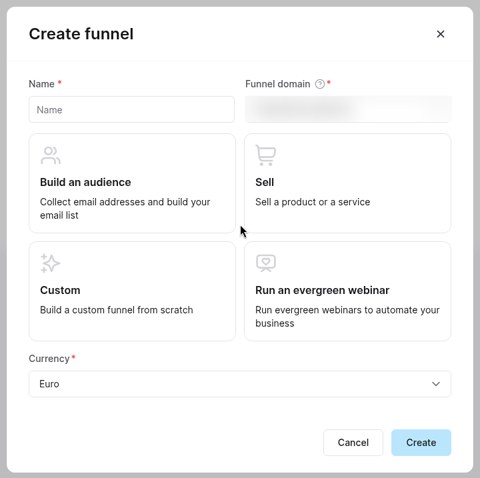
Sign up and log in. Go to Funnels, then click Create. Give your funnel a name and pick the goal that matches what you want, like collecting emails.
Step 2: Pick an opt-in template
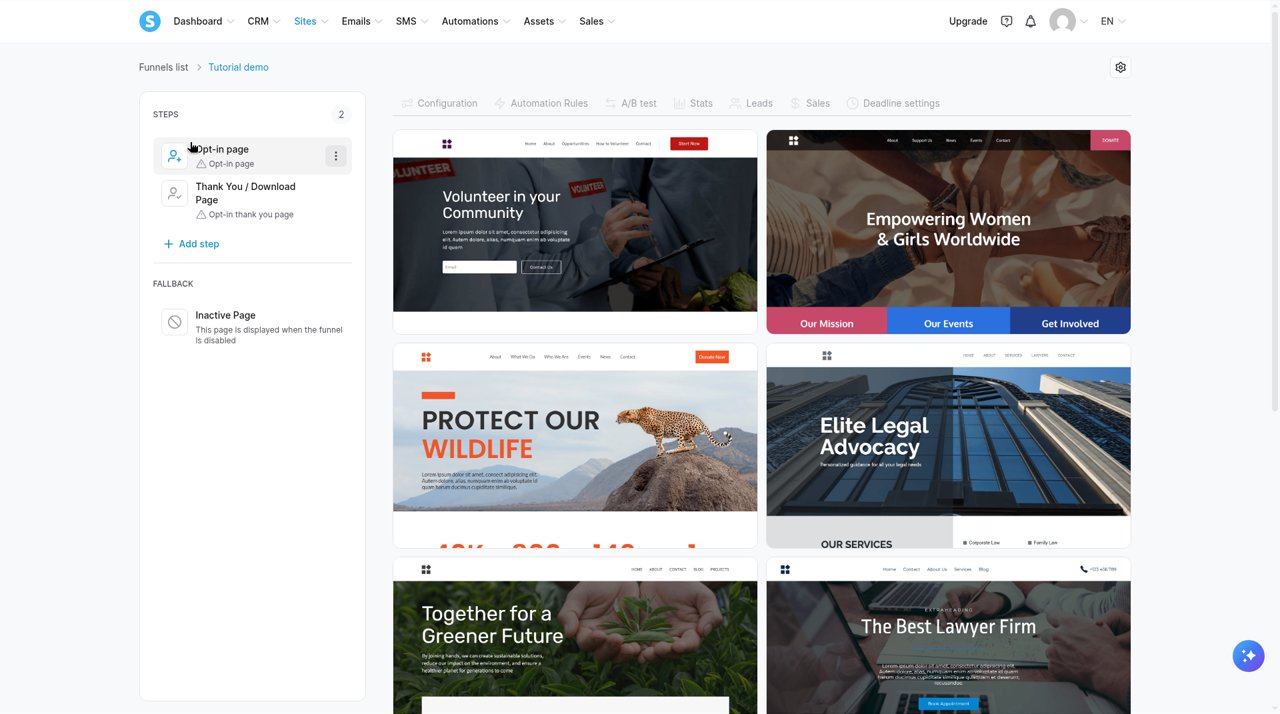
Inside your new funnel, add your first step. Choose an opt-in (signup) page and pick a template you like. Don’t overthink it. You can change everything later.
Step 3: Edit the page
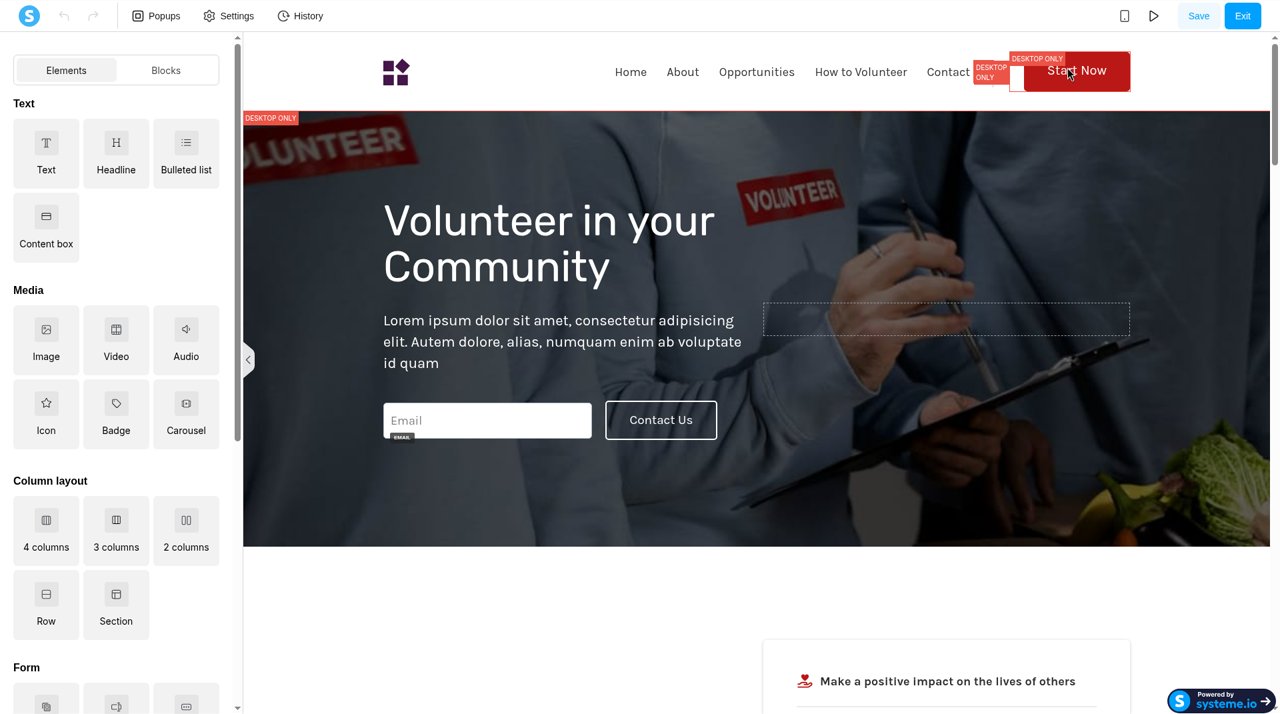
Open the page in the editor. Change the headline, the text and the image. Say what the freebie is and why it’s useful. Keep the form short. Name and email is plenty.
Save your changes and preview the page.
Step 4: Send the freebie automatically
Now set up the email that delivers your freebie. Open Automation Rules for your funnel step.
- Click + Add rule. Set the trigger to the funnel step form being subscribed to.
- Click + Add step. Choose the action to send an email, and write an email that includes your freebie (a link or file).
- Save the rule.
Test it with your own email address before you share the page.
That’s your first funnel. When you’re ready to sell, you can add a sales page and a product to the same funnel.
Honest downsides
- 1 automation rule on free. Fine for one freebie. Tight for anything more.
- 1 email campaign on free. You’ll feel this once you want a proper welcome series.
- Basic email tools. It does the job, but dedicated email platforms go deeper on design and segmentation.
- Branding on free pages. The pricing page doesn’t say whether free pages show Systeme.io branding. Check your published page before you share it.
- Lots of menus. It does many things, so there’s a lot to learn at first.
Is it for you?
| Good fit | Not a great fit |
|---|---|
| Beginners who want funnels, email and courses in one place | People who need advanced email design or segmentation |
| Anyone who wants to start free with no card | Teams that already run a full email platform they like |
| Creators selling a first simple product | Anyone who needs many automations from day one on a free plan |
Comparing options? See Systeme.io vs MailerLite.
FAQ
Is Systeme.io really free forever?
The pricing page lists the free plan as free forever, with no card required.
Are there transaction fees?
The pricing page lists 0% transaction fees on the free plan.
Can I sell courses on the free plan?
Yes. The free plan includes 1 course with up to 500 students.
What if I outgrow the free plan?
You can upgrade. Startup is $17/month and raises the limits to 5,000 contacts, 10 funnels and 5 courses. Paying yearly gets you 2 months free.
Related guides
- Systeme.io vs MailerLite: read it here
Last checked: November 2026