

Ad / affiliate disclosure: This post contains affiliate links. If you buy through them we may earn a commission at no extra cost to you. Based on Jotform’s official pricing and feature pages, checked November 13, 2026. See our affiliate disclosure.
Quick answer: As of November 13, 2026, Jotform’s free Starter plan gives you 5 forms, 100 form submissions a month, 500 stored submissions in total, 10 payment submissions and 10 signed documents a month, plus 100 MB of upload space. Forms carry Jotform branding. The cheapest paid plan is Bronze, at $39 a month or $408 a year (billed yearly), according to Jotform’s official pricing page.
Quick verdict
Jotform Free fits low-volume forms: a club sign-up sheet, a one-off survey or a simple contact form. It gets tight fast if you take bookings every day, sell anything through a form, or need to keep more than 500 responses in your account. Check the monthly submission count and the 500-entry storage cap before you build anything important on it.
Our take from the official pages: the binding limit is the 500-entry storage cap, not the 100-a-month count — a form taking 60 enquiries a month hits the storage cap in about eight months, and the oldest entries are deleted unless you export and purge. And the 100-a-month count is account-wide, so five forms share it.
Pricing
Prices below are from Jotform’s official pricing page, checked November 13, 2026. The FAQ says Jotform charges in euros if you’re in Europe and in US dollars everywhere else, and your bank or card statement shows the converted local amount. Tax is added to the final price where local rules require it, Jotform says. Check the price you see at checkout.
On a narrow screen, swipe the table sideways to see every column.
| Plan | Price | Key limits | Source |
|---|---|---|---|
| Starter (free) | $0 | 5 forms · 100 submissions/month · 500 stored · 10 payments/month · 10 signed docs/month · 100 MB uploads · Jotform branding | jotform.com/pricing, checked 2026-11-13 |
| Bronze | $39/month or $408/year (billed yearly) | 25 forms · 1,000 submissions/month · 10,000 stored · 100 payments/month · 100 signed docs/month · 1 GB uploads | jotform.com/pricing, checked 2026-11-13 |
| Silver | $49/month or $468/year (billed yearly) | 50 forms · 2,500 submissions/month · 25,000 stored · 250 payments/month · 250 signed docs/month · 10 GB uploads | jotform.com/pricing, checked 2026-11-13 |
| Gold | $129/month or $1,188/year (billed yearly) | 100 forms · 10,000 submissions/month · 100,000 stored · 1,000 payments/month · 1,000 signed docs/month · 100 GB uploads · HIPAA features | jotform.com/pricing, checked 2026-11-13 |
| Enterprise | Custom | Multi-user plan; contact Jotform | jotform.com/pricing, checked 2026-11-13 |
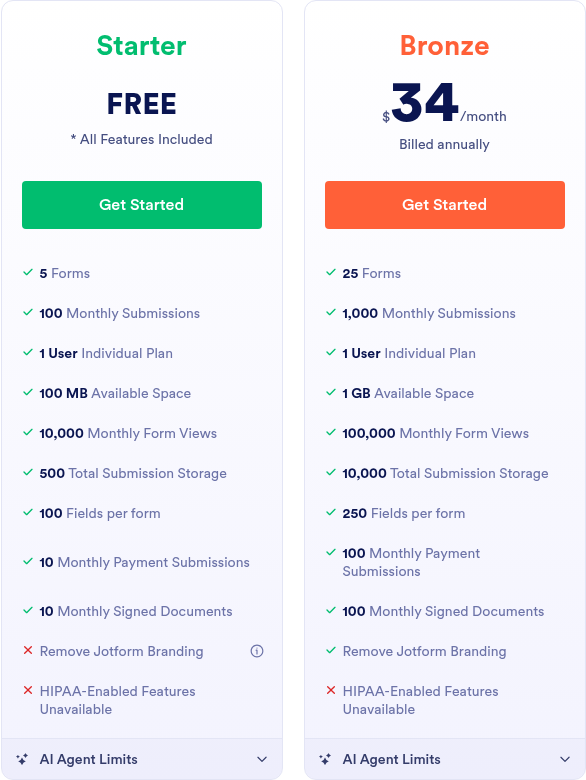
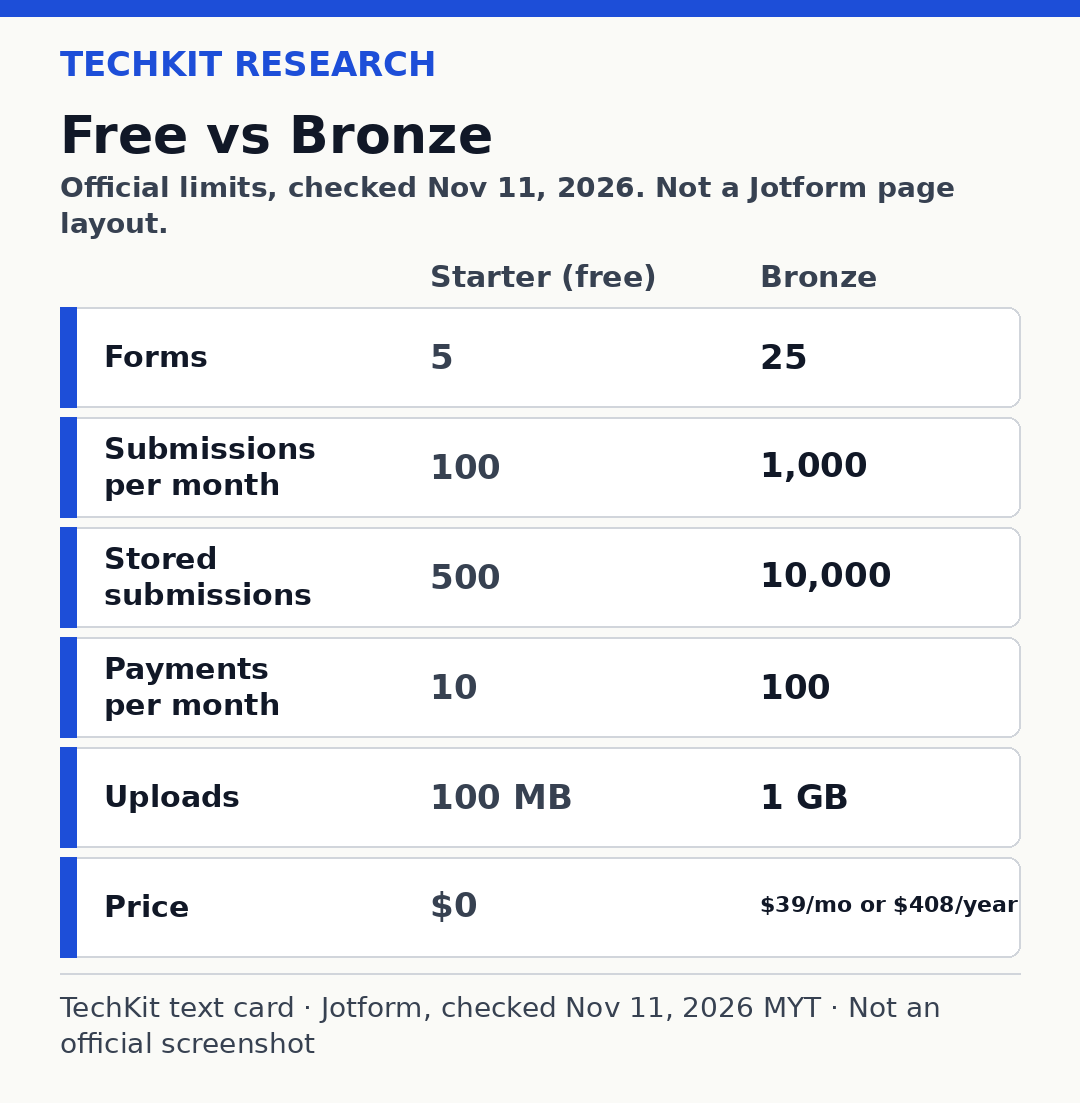
On yearly billing, Bronze works out to $34 a month ($408 ÷ 12), Silver to $39 and Gold to $99. That’s our division of Jotform’s yearly totals.
Pros and cons
Pros – A real free plan with no stated end date, not a short trial.
– The free plan includes Jotform’s standard features — templates, payment integrations and widgets. HIPAA features are the exception.
– 10,000 form views a month is plenty for most small forms.
– You can take a small number of payments (10 a month) without paying Jotform a plan fee.
– If you upgrade later, Jotform says the change is prorated and your limits increase immediately.
Cons – 100 submissions a month across your whole account, not per form.
– Only 500 submissions can be stored in total. Past that, Jotform deletes the oldest entry to make room.
– Jotform branding on forms and signed documents.
– Only one email notification, to one recipient, on the free plan.
– No trial for paid plans. Starter is the trial.
– The jump to the first paid plan is $39 a month.
Who it’s for
Good fit if… – You run a small club, class or community group and collect a few dozen responses a month.
– You need a one-off survey, RSVP or feedback form.
– You’re a freelancer with a contact or intake form that gets a handful of entries a week.
– You want to try Jotform’s builder before paying, since there’s no paid trial.
Skip it if… – You expect more than about 3 submissions a day, every day.
– You sell products or take deposits through forms more than 10 times a month.
– You need forms without Jotform branding.
– You collect health information that needs HIPAA features. Jotform says those are only on Gold and Enterprise.
Key features and limits on the free plan
100 submissions a month, account-wide
Jotform’s account usage and limits guide (last updated October 10, 2025) puts the submission limit at the total number of entries from all your forms, per account, each month. Entries created with Import Data count as submissions too. The count resets on the first day of your monthly usage cycle; you can see your reset date on your Account Usage page.
Five forms don’t get 100 submissions each. They share 100. Deleting or purging submissions doesn’t free up the monthly count either. The same guide says that applies to submissions, signed documents and payment submissions.
500 stored submissions in total, and the oldest gets deleted
This is the limit people miss. The free plan keeps only 500 submissions in your account in total, separate from the monthly cap. Jotform’s pricing FAQ says that if you exceed your total submission storage, “the system will delete the oldest form response” to make room for new ones.
Unlike the monthly limit, this total doesn’t reset. You manage it yourself. Jotform says you can free space by purging entries, and recommends downloading old submissions first so you don’t lose data. If you rely on your history, export regularly.
10 payments and 10 signed documents a month
Payment submissions are entries from forms with a payment integration. The free plan allows 10 a month across your account. Signed documents — completed Jotform Sign processes — are also capped at 10 a month. Both are monthly limits that reset with your usage cycle.
5 forms, 100 MB of uploads, 100 fields, and branding
You get 5 active forms. Jotform counts active ones, so you can disable an old form to stay within the limit. Each form can have up to 100 fields. Upload space is 100 MB account-wide for files people attach to your forms. To free that space, Jotform says you delete and then purge entries that have file uploads.
Forms and signed documents on Starter show Jotform branding, which the FAQ says you can remove on a paid plan.
Two smaller limits from Jotform’s help guide: the Starter plan allows only one email notification with one recipient, and digest emails go to one recipient (10 on paid plans).
AI Agents on the free plan
As of November 13, 2026, the pricing page lists AI Agent limits for Starter: 5 active AI Agents and 100 conversations a month, among other caps. These AI limits are newer and may change, so check the pricing page before relying on them.
What happens when you hit a limit
Jotform says it emails you and shows a warning on your dashboard when you reach a usage limit. The help guide says that reaching any monthly limit, or your upload space, disables your forms on the date given in that email, and they show a “Form over quota” message. Hit a monthly limit, and you wait for the reset or upgrade. Hit the upload cap, and you can purge entries with files. Go over total submission storage, and the oldest entry is deleted to make room.
So if your monthly cap runs out on day 20, a booking or registration form could stop accepting entries for the rest of the cycle. Plan for that before a busy month.
Will Free fit? Four quick scenarios
These use only the limits above. The arithmetic is ours.
- Club survey, once a quarter, 80 replies. That’s 80 of your 100 monthly submissions. It fits, and four quarters add up to 320 stored entries, under the 500 cap.
- Booking form, 5 bookings a day. 5 × 30 days = 150 a month, over the 100 cap. You’d hit the limit around day 20. Bronze (1,000 a month) covers it.
- Small shop taking 15 paid orders a month through a form. Over the 10 payment submissions allowed. Free doesn’t fit.
- Lead form, 60 enquiries a month. It fits the monthly cap, but at 60 a month you’d reach 500 stored entries in about 8 months (500 ÷ 60 ≈ 8.3). After that, the oldest leads start being deleted unless you export and purge.
Ways to stretch the free plan, or pay less
– Export and purge old entries to stay under the 500 stored limit and the 100 MB upload space.
– Disable forms you no longer use to stay within 5 active forms.
– Nonprofits and schools: Jotform’s pricing FAQ offers 50% off Bronze, Silver and Gold, on both monthly and yearly plans, after you apply. Its separate nonprofit page describes the offer as 50% off annual plans, so confirm which billing period qualifies when you apply.
– Seasonal sales: Jotform says these only apply when upgrading to a higher-tier yearly plan, and plans renew at full price in the next period. Don’t count on a discount lasting.
– Pay yearly if you’re sure. Bronze is $408 a year (billed yearly) instead of $468 at the monthly rate.
If you do upgrade, the pricing page says Jotform offers a 30-day money-back guarantee: a full refund if you cancel within 30 days of payment. Plans auto-renew monthly or yearly until you cancel. Cancel and you keep the paid plan until the next billing date, then the account moves back to Starter. Jotform accepts card or PayPal.
Alternatives
If you mainly need opt-in or lead forms for email marketing, a marketing platform with built-in forms may cover it:
Google Forms and Tally are other common free form builders. We haven’t checked their current limits for this article, so we’re not comparing numbers here.
Quick questions
Is Jotform free forever?
Yes. The Starter plan is free with no stated end date. It’s limited to 5 forms, 100 submissions a month, 500 stored submissions and 100 MB of uploads, and forms carry Jotform branding. You upgrade only if you need higher limits.
How many submissions do you get on Jotform’s free plan?
100 per month, across all your forms, plus a total storage cap of 500 submissions. The monthly count resets on the first day of your usage cycle. Deleting submissions doesn’t give the monthly count back, according to Jotform’s help guide.
Does Jotform’s free plan show branding?
Yes. Jotform’s FAQ says forms and signed documents on Starter include Jotform branding, which you can remove with a paid subscription.
What is the cheapest paid Jotform plan?
Bronze: $39 a month, or $408 a year (billed yearly, about $34 a month), as of November 13, 2026. Jotform charges in US dollars outside Europe and in euros in Europe, and tax may be added.
What happens when you reach the limit?
Jotform emails you and shows a dashboard warning. Hitting a monthly limit or your upload space disables your forms on the date in the email, with a “Form over quota” message, until the reset or an upgrade. Over the storage cap, the oldest entry is deleted.
Can you take payments on Jotform’s free plan?
Yes, up to 10 payment submissions a month across your account. Bronze raises that to 100 a month.
Is Jotform HIPAA compliant on the free plan?
No. Jotform says HIPAA compliance features are available on Gold and Enterprise only.
Is there a free trial of Jotform’s paid plans?
No. Jotform says there’s no trial for paid plans; Starter is the way to try the standard features. Paid plans come with a 30-day money-back guarantee.
Does Jotform have a nonprofit discount?
Yes. Jotform’s pricing FAQ says eligible nonprofits and educational institutions can get 50% off Bronze, Silver and Gold, monthly or yearly, after applying. Its nonprofit page describes the offer as 50% off annual plans, so confirm the billing period when you apply.
Ready to try it?
Start on the free Starter plan, watch your monthly count and your 500-entry storage, and upgrade only when a real form outgrows it.
Sources
– Jotform Features and Pricing (plans, FAQ, money-back guarantee) (checked 2026-11-13)
– Jotform Help: Understanding Your Account Usage and Limits (last updated 2025-10-10; checked 2026-11-13)
Last updated: November 13, 2026
1 thought on “Jotform Free Plan Limits (2026): 100 Submissions, 5 Forms”