
Affiliate disclosure: We’ve applied to these tools’ affiliate programs but don’t have affiliate links yet, so every link on this page is a regular link. If that changes, we’ll update this note. Any commission never costs you extra.
TL;DR
- Want to start for $0? MailerLite. Its Free plan covers up to 250 subscribers and 2,500 emails a month. AWeber has no free plan, only a 14-day free trial.
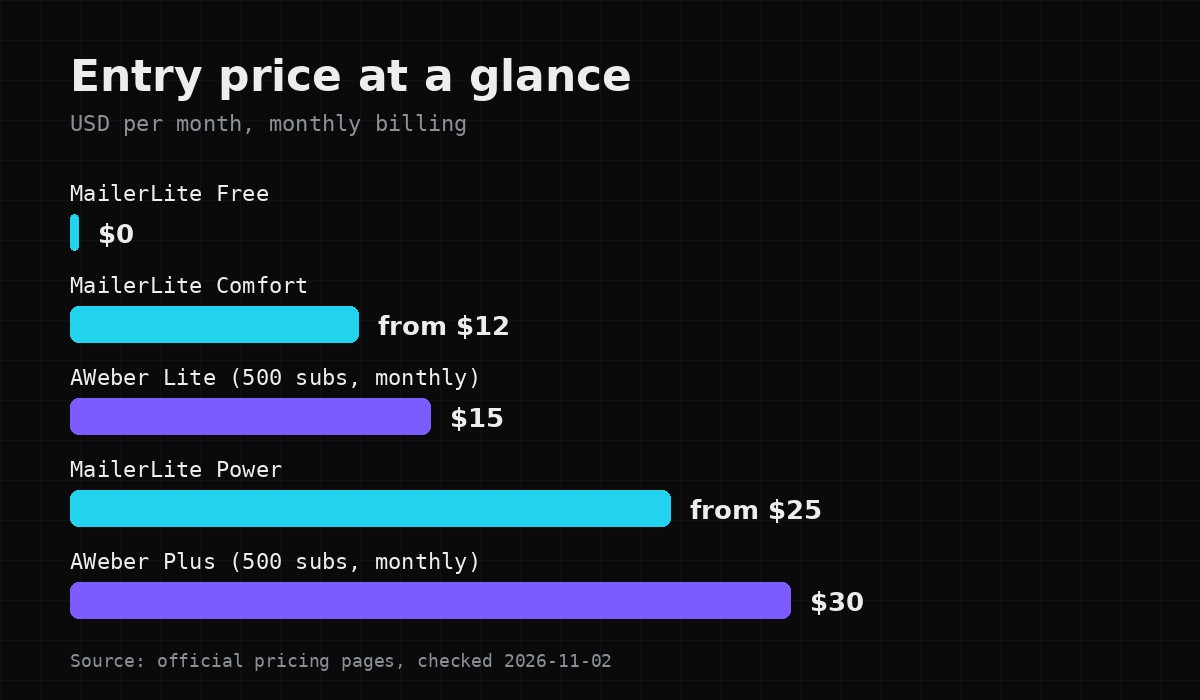
- Cheapest paid entry: MailerLite Comfort starts at $12/month. AWeber Lite is $15/month for up to 500 subscribers on monthly billing ($12.49/month billed annually).
- Unlimited sending: MailerLite Power (from $25/month) has unlimited monthly emails under a fair use policy. AWeber caps sends at 10x (Lite) or 12x (Plus) your subscriber tier.
- Phone support: AWeber lists phone support on its plans. MailerLite’s pricing page lists knowledge base, email and live chat, depending on plan.
What each tool is best at
AWeber has been around a long time and leans toward creators and small businesses who want help. Its pricing page lists 24/7 support on Lite, priority chat, email and phone support on Plus, free migration, and a paid “Done For You” setup service.
MailerLite pitches itself on price and simplicity. Every paid plan gets the full feature set; you pay more only for a bigger list or more sending. The free plan is a real working plan, not a time-limited trial.
If you also need funnels, courses or a checkout in one place, neither of these is built for that. We compared that kind of all-in-one tool in Systeme.io vs MailerLite.
Free plan vs free trial
This is the biggest difference.
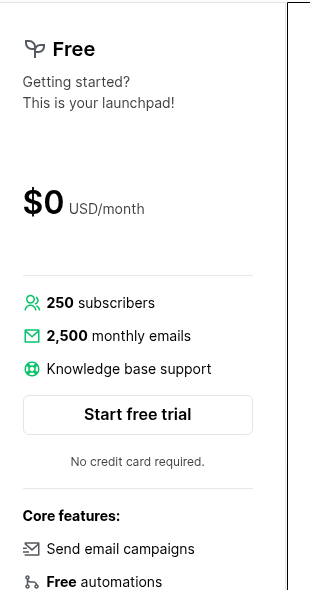
MailerLite Free (no credit card required):
– Up to 250 subscribers
– 2,500 emails per month
– 2 user seats
– 3 active automations (5 steps each), 1 website, 1 landing page, 3 active forms
– Knowledge base support only
If a free account goes over 250 active subscribers, MailerLite locks sending (campaigns and automations) until you upgrade or remove subscribers. New accounts also get a 14-day trial of premium features.
AWeber has no free plan. You get a 14-day free trial of Lite or Plus, then you pay.
Paid pricing
Prices below are from the official pricing pages on November 2, 2026, in USD. Both tools price by list size, so your real cost depends on your subscriber count.
AWeber
| Plan | 500 subscribers, monthly billing | Billed annually | Monthly sends |
|---|---|---|---|
| Lite | $15/month | $150/year (shown as $12.49/month) | 10x subscriber tier |
| Plus | $30/month | $240/year (shown as $19.99/month) | 12x subscriber tier |
| Done For You | $20/month billed annually + one-time setup fee | — | 12x subscriber tier |
A few more points from AWeber’s tables: at 1,000 subscribers, Lite is $25/month and Plus is $45/month (monthly billing). At 10,000 subscribers, Lite is $100/month and Plus is $135/month. The Done For You setup fee was shown as $79 (marked down from $599) as a limited-time offer; check current pricing, because promotions change.
MailerLite
| Plan | Starting price | Monthly sends |
|---|---|---|
| Free | $0 | 2,500 |
| Comfort | from $12/month | 10x the top of your subscriber tier |
| Power | from $25/month | Unlimited (fair use policy) |
| Enterprise | Custom (200K+ subscribers) | Custom |
MailerLite offers a 10% discount for yearly billing and 30% off paid plans for verified nonprofits. Exact prices by list size are set with a slider on the pricing page, so check current pricing for your number.
Automation and email features
AWeber
– Lite: 3 email automations, 1 list, 1 custom segment, 3 landing pages, 3 users
– Plus: unlimited automations, lists, landing pages, segments and users
– Listed on the pricing page: drag-and-drop builder, HTML emails, RSS to email, AI Subject Line Assistant, dynamic content, AMP emails, split testing, behavioral automation, tagging
– Built-in ecommerce with transaction fees of 1.0% on Lite and 0.6% on Plus
– Web push notifications (Lite up to 50,000 web push subscribers)
MailerLite
– Visual automation builder on all plans
– Active automations: 3 (Free), 50 (Comfort), unlimited (Power); up to 100 steps on paid plans
– Multiple automation triggers on Power
– Listed on the pricing page: drag-and-drop, simple and custom HTML editors, email A/B testing, multivariate testing (paid), dynamic content, RSS campaigns, auto resend, AI writing assistant, smart sending, surveys and quizzes
– Sell digital products, bookings and paid newsletters
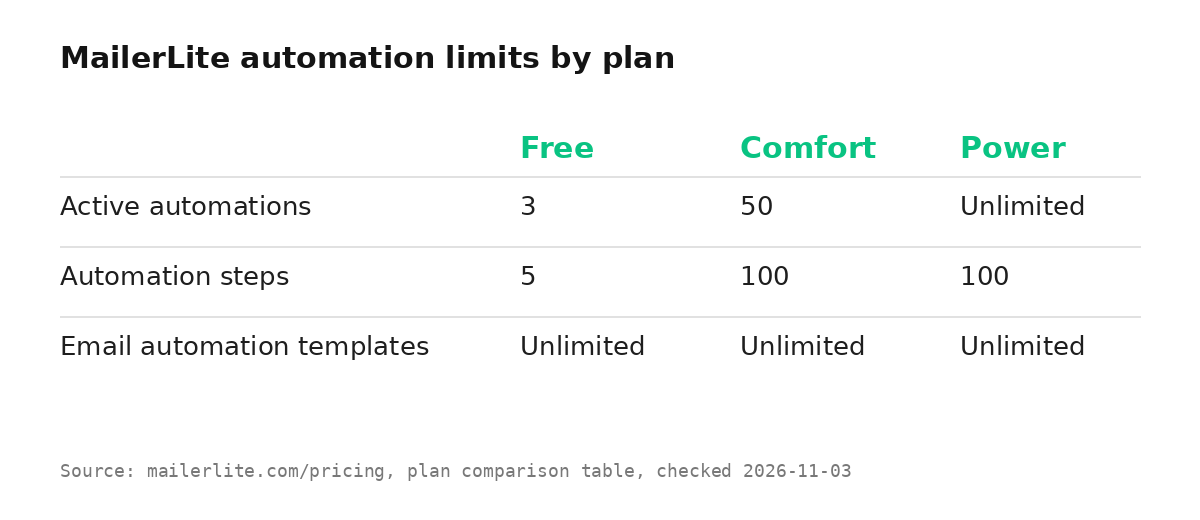
In short: on the cheap plans, both limit automations hard (3 each on AWeber Lite and MailerLite Free). If automations matter, compare AWeber Plus with MailerLite Comfort or Power.
MailerLite pricing page
AWeber pricing page
Landing pages and forms
AWeber: 3 landing pages on Lite, unlimited on Plus. The pricing page lists landing page templates, video landing pages, Google Analytics and Facebook pixel tracking, buying and connecting domains, sign-up forms and a WordPress plugin.
MailerLite: 1 website and 1 landing page on Free, 10 on Comfort, unlimited on Power. Active forms: 3, 10, unlimited. It also lists pop-ups, embedded forms, form A/B testing, an AI landing page builder, website blog sections and custom domains.
Both cover the basics for collecting emails. MailerLite’s site builder goes a bit further if you want a simple website too.
Deliverability and support
We don’t have independent deliverability data, so here is only what each company states officially.
AWeber lists “detailed deliverability reporting” on its plans.
MailerLite says it monitors account lists, content and response data to protect the reputation of its shared IPs. Enterprise lists deliverability support and a dedicated IP (as an add-on).
Neither of these is a guarantee of inbox placement. Your list quality and sending habits matter more than the tool.
Support, per the pricing pages:
– AWeber Lite: 24/7 support. Plus: priority chat, email and phone. Free migration.
– MailerLite Free: knowledge base. Comfort: email support. Power: priority email and 24/7 live chat. During the 14-day trial, 24/7 live chat and email.
Honest downsides
AWeber
– No free plan, only a 14-day trial.
– Lite is tight: 1 list, 3 automations, 3 landing pages, 1 segment.
– Sends are capped at 10x or 12x your subscriber tier.
– The pricing page leads with a limited-time offer, which can make the real ongoing price harder to read at a glance.
MailerLite
– Free plan has no live chat or email support.
– Go over 250 subscribers on Free and sending stops until you upgrade.
– Subscribers count cumulatively within a billing cycle, so deleting contacts doesn’t lower that month’s count.
– Free plan API/MCP access is limited and can’t send email.
Who should pick which
Pick MailerLite if you’re starting from zero, want a usable free plan, or want unlimited sending at a moderate price (Power).
Pick AWeber if you value phone support, want someone to set things up for you (Done For You), or want built-in web push and ecommerce in your email tool.
Pick neither (look at an all-in-one) if you also need funnels, courses and checkout. See Systeme.io vs MailerLite.
FAQ
Does AWeber have a free plan?
No. As of November 2, 2026, AWeber offers a 14-day free trial, then paid plans starting at $15/month (Lite, 500 subscribers, monthly billing).
How many subscribers does MailerLite’s free plan allow?
Up to 250 subscribers and 2,500 emails per month.
Which is cheaper?
At the entry level, MailerLite: Free costs $0 and Comfort starts at $12/month. AWeber Lite starts at $15/month. At larger list sizes, compare both sliders, because prices scale with subscribers.
Does MailerLite need a credit card for the free plan or trial?
The pricing page says no credit card is required.
Can I move my list from one to the other?
AWeber lists free migration. MailerLite has a migration page and a success team for large lists. Check each provider’s current migration terms.
Prices and limits checked on official pages on 2026-11-02. Check current pricing before you buy.