
this article contains no affiliate links. All links are plain links, and we earn nothing if you click them. See our affiliate disclosure. How this article was prepared: AI helped gather and draft this research; a person checked the facts against the cited sources.
Quick answer: Google launched computer use in the Gemini app for Mac on November 19, 2026. It lets Gemini carry out multi-step tasks across local files, desktop apps and the web in an isolated background window, while the user keeps working. It is rolling out in English in the U.S. for Google AI Plus, Pro and Ultra subscribers on Apple Silicon Macs running macOS Sequoia 15.0+.
What it does
Describe a task and Gemini handles the clicking, typing, menus and forms. Google gives four examples: batch color-grading photos in design software or setting up complex 3D scenes; extracting weights, dimensions and addresses from local PDFs to fill out multi-box shipping quotes; pulling metrics and screenshots from live dashboards into a presentation in Google Slides; and analyzing clothing photos from a local folder, researching pricing and staging listings on resale platforms. The Verge sums up the same uses as speeding up workflows, filling in forms, making presentations and listing items for sale.
How it works and staying in control
Gemini works in an isolated background window with a live preview right in the chat, so the main screen and cursor stay free. The user chooses which apps Gemini can access, watches every step live and approves key actions before they happen. Google pauses for logins and payments, and the user can stop Gemini at any time with one click.
Gemini can view only files or directories specifically added to the Connected folders toolbar, not the whole Mac. It creates temporary backups of files it works with, deleted when a new task starts or after 24 hours. Google cautions that Gemini can make mistakes, permanently delete Workspace or computer files, and send or share files with third parties.
Who can use it
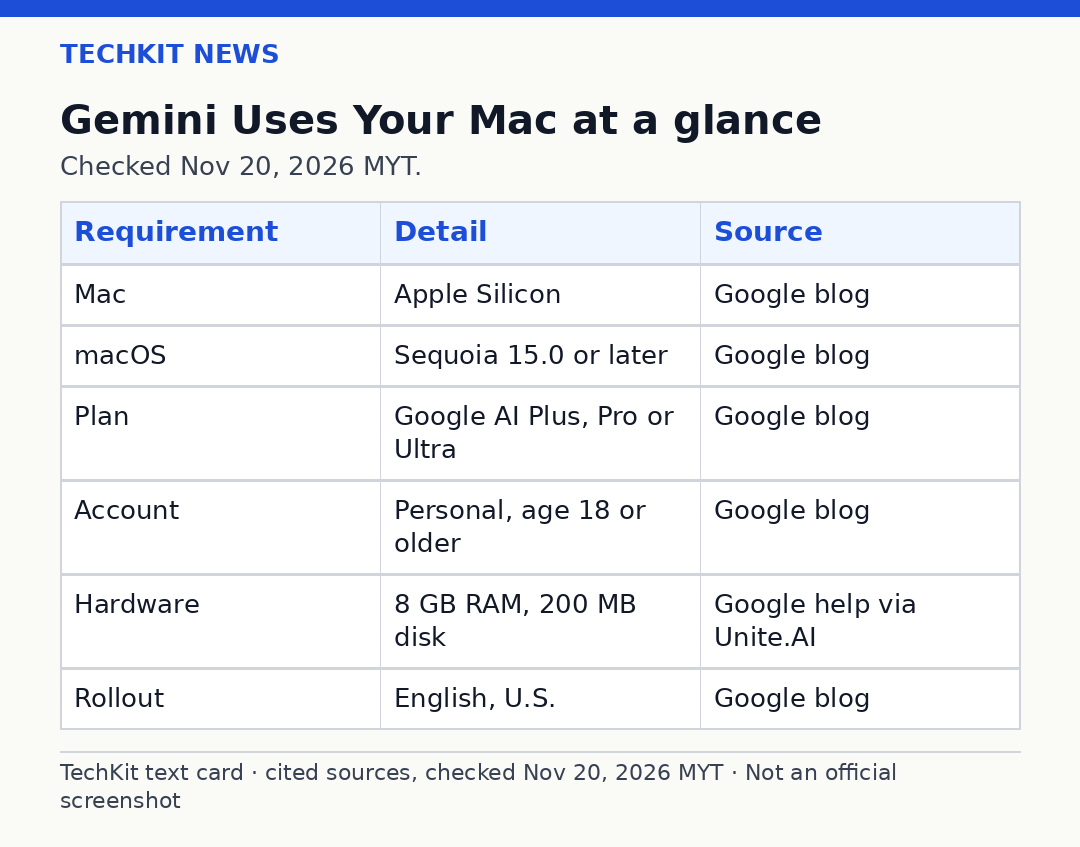
Computer use requires an Apple Silicon Mac running macOS Sequoia 15.0 or later, a personal Google account for someone aged 18 or older, and a Google AI Plus, Pro or Ultra subscription. Google also lists at least 8 GB of RAM, 200 MB of available disk space and a stable internet connection. It is rolling out in English in the U.S., and Google has not said when it will expand to other markets or platforms. Free users and work accounts are not part of this first rollout, and Intel-based Macs are left out. To use it, add @Computer use to a prompt. In Customize > Connectors, new Desktop apps like Blender and Autodesk Fusion join Git and Obsidian.
How it compares
TechCrunch notes Google is a little late to this: OpenAI, Anthropic and Meta have already been offering agentic features in their desktop applications for some time. It is also different from the Gemini features already on the Mac. The existing Task feature, previously Gemini Spark, could just access local files in conjunction with Connected Apps like @Gmail or @Google Calendar. Computer use adds clicking and typing inside desktop apps and the web. Google only this week announced the broader rollout of Gemini Tasks, which lets the AI sign into websites, make online purchases or book appointments. It also recently began admitting early testers to its revamped CC AI agent for families.
Quick questions
What is computer use in the Gemini app for Mac?
It lets Gemini carry out multi-step tasks across local files, desktop apps and the web in an isolated background window.
Who can use it?
Google AI Plus, Pro or Ultra subscribers in the U.S., on an Apple Silicon Mac running macOS Sequoia 15.0 or later.
What can it do?
Batch color-grading photos, filling out shipping quotes from PDFs, building a presentation in Google Slides from dashboards, and staging resale listings.
What controls do I have?
You choose which apps Gemini can access, watch every step live and approve key actions. Google pauses for logins and payments, and you can stop it with one click.
How is it different from Gemini Tasks?
Tasks lets the AI sign into websites, make online purchases or book appointments. Computer use clicks and types directly inside desktop apps and the web.
When will it come to other countries or platforms?
Google has not said when it will expand to other markets or platforms.
Sources
Google Blog: Automate Mac tasks with Gemini computer use — https://blog.google/innovation-and-ai/products/gemini-app/computer-use-mac/ — November 19, 2026
TechCrunch: Google gives Gemini the ability to use your Mac for you — https://techcrunch.com/2026/11/19/google-gives-gemini-the-ability-to-use-your-mac-for-you/ — November 19, 2026
The Verge: Gemini on Mac can now use your computer — https://www.ai-news-brief.info/gemini-on-mac-can-now-use-your-computer/ — November 19, 2026 (mirror of The Verge article; the Verge URL was not available)
9to5Google: Gemini app for Mac adds computer use to control desktop apps — https://9to5google.com/2026/11/19/gemini-mac-computer-use/ — November 19, 2026
Unite.AI: Google Adds Computer Use to Gemini on Mac for Multi-Step Tasks — https://www.unite.ai/google-adds-computer-use-to-gemini-on-mac-for-multi-step-tasks/ — November 19, 2026
Last checked: November 20, 2026, MYT.