
Disclosure: the Fireflies.ai links in this article are affiliate links. If you sign up through them we may earn a commission, at no extra cost to you. All other links are plain links. See our affiliate disclosure. Based on Fireflies.ai’s and Otter.ai’s official pricing and feature pages, checked November 13, 2026.
Quick answer: Otter Basic includes 300 transcription minutes per month and access to up to 30 minutes of transcript per conversation. Fireflies Free lists up to 2 hours of recording per meeting, but storage is capped at 400 minutes. For accounts created on or after September 1, 2026, Fireflies documents a default of 3 meeting transcriptions, with unlimited eligible transcriptions unlocked by a qualifying Auto-join setting. These are published plan limits, not our test results.
For meetings longer than 30 minutes, Fireflies Free has more room on paper within its 2-hour meeting-recording limit, provided your capture method, Auto-join settings and remaining storage fit the call. Otter Basic may suit short recordings within its monthly allowance. Its 30-minute limit restricts transcript access; it does not stop the recording.
Try Fireflies free — no card needed for the free plan.
Our take after reading both vendors’ docs: the two free plans fail in opposite ways. Fireflies Free gives you the longer meeting but makes you earn it — Auto-join on, storage at 400 minutes, and AI credits whose terms the help pages can’t agree on. Otter Basic gives you a clean monthly number (300 minutes) but cuts transcript access at 30 minutes per conversation. If your calls run 45–60 minutes, Fireflies is the only free option that shows you the whole transcript — provided you set up Auto-join and have storage left.
The figures below are what each company publishes.
Free plans side by side
| Fireflies Free | Otter Basic | |
|---|---|---|
| Price | $0, “free forever” | Free |
| Meeting apps | Zoom, Google Meet, Teams, + more | Zoom, Teams, Google Meet |
| Transcription | “Unlimited”* — new accounts (since Sep 1, 2026) get 3 transcriptions unless Auto-join is on | 300 minutes per user per month (no rollover) |
| Per-conversation duration limit | Up to 2 hours of meeting recording; the bot leaves at its plan limit | Access to up to 30 minutes of transcript; recording/import does not stop at 30 minutes |
| Storage | 400 mins/team (pricing page; help centre says 400 minutes per seat) | Conversation history: 25 most recent |
| File uploads | Allowed; each upload uses 1 transcription credit (up to 100MB / 150 min per file) | 3 lifetime imports |
| AI summaries | Limited | Automated summaries included |
| AI assistant | AskFred is limited. Fireflies lists 20 Free AI credits, but its official pages conflict on reset period and whether the allowance is per seat or shared across the team; see the note below. | AI Chat: 20 queries per user per month (3 per conversation) |
| Download / export | Downloading transcripts needs a paid plan | Export mp3, txt |
Duration limits refer to the specific recording or transcription feature described by each vendor. Fireflies file uploads have separate file-size, duration and transcription-credit limits.
Fireflies documentation conflict: one Free-plan help page says 20 AI credits per month; another says 20 one-time credits per seat; the billing terms say one-time credits shared across the team. The pages also disagree on whether AI summaries use credits — one help page says summaries are unlimited on Free, another says they use AI credits, and the billing terms say summaries are never charged in credits. We cannot confirm the reset period, allocation scope or Free summary allowance from these conflicting pages. Do not read “unlimited transcripts” as a promise of unlimited AI summaries.
Fireflies’ pricing page advertises unlimited transcription, but its help centre sets conditions for Free accounts created on or after September 1, 2026. Auto-join must be on with a qualifying meeting filter; “Only when I invite fred@fireflies.ai” does not unlock unlimited transcriptions. With Auto-join off, the documented default is 3 meeting transcriptions. Older accounts that already had unlimited free meetings keep their existing limits. Review the meeting filter and get any required recording consent before enabling automatic capture. Storage remains limited.
Before using Fireflies for a longer call, check our Fireflies free-plan limits guide for the qualifying Auto-join filters, storage cap and unresolved AI-credit terms.
Where Fireflies Free wins
- Longer transcript access, with conditions. Fireflies Free documents up to 2 hours of meeting recording, compared with Otter Basic’s 30-minute accessible transcript limit. That can matter for a 45–60 minute call, but check Fireflies’ Auto-join eligibility and remaining storage. We have not verified transcription quality or completeness in a hands-on test.
- Eligible meeting transcriptions without a monthly count. Fireflies documents unlimited eligible transcripts when the Free plan’s qualifying Auto-join conditions are met. That does not remove storage, recording-duration or file-upload credit limits. Otter Basic includes 300 transcription minutes per month.
- File uploads have separate limits. Fireflies says each uploaded file uses one transcription credit, with limits of 100MB and 150 minutes per file. The available transcription-credit balance matters. Otter Basic allows 3 file imports over the life of the account.
- Languages. Fireflies lists transcription in 100+ languages. Otter’s pricing page lists English, Spanish, French, German, Japanese and Chinese.
Where Otter Basic wins
- A stated monthly allowance. Otter Basic includes 300 transcription minutes per month, with a 30-minute accessible transcript limit per conversation and 3 lifetime file imports. Fireflies’ unlimited Free transcription depends on a qualifying Auto-join configuration. That condition should not be confused with requiring a bot in every meeting: Fireflies also documents extension and mobile recording methods.
- Export on free. Otter Basic exports mp3 and txt. Fireflies says downloading transcripts requires a paid plan.
- Summaries. Otter includes automated summaries with action items on Basic. Fireflies’ free summaries are “Limited.”
- Storage feels simpler. Otter keeps your 25 most recent conversations. Fireflies’ 400-minute storage (“400 mins/team” on the pricing page, “per seat” in the help centre) fills up fast with long meetings, and then you’re deleting old ones to record new ones.
Still leaning Fireflies?
Before choosing Fireflies Free for longer calls, check its 2-hour meeting-recording limit, remaining storage and the capture method you plan to use. For eligible unlimited transcriptions on a new account, review the qualifying Auto-join filters and recording consent requirements rather than enabling capture for every meeting by default. Start with Fireflies Free if it fits.
What upgrading costs
Prices in USD from the official pricing pages, checked November 13, 2026. Prices can vary by region and offer, so confirm on the page before you buy.
| Fireflies | Otter | |
|---|---|---|
| Entry paid plan | Pro: $18/seat/month monthly, or $10/seat/month (billed yearly) | Pro: $16.99/user/month monthly; $8.33/user/month (billed yearly) |
| What it adds | Unlimited transcription and AI summaries, 8,000 min storage per seat, video recording, downloads | 1,200 minutes/month, up to 90 min per meeting, 10 imports a month, unlimited storage, 50 AI Chat queries |
| Team plan | Business: $29/seat monthly, or $19 (billed yearly) — unlimited storage, 30 AI credits | Business: $30/user monthly ($24/user/month for first-time subscribers, 20% off for 3 months); $19.99/user/month (billed yearly) — unlimited meetings, up to 4 hours per meeting |
Otter’s monthly Business card now shows a first-time-subscriber offer ($24/user/month, 20% off for 3 months); the Pro card shows no first-time offer. Otter offers 20% off Pro for students and teachers with a .edu email — Pro Annual $6.67/month (billed $79.99 annually), Pro Monthly $13.59/month.
For duration and volume, Otter Pro lists 1,200 transcription minutes per month and a 90-minute per-conversation limit. Fireflies Pro lists unlimited transcription, but its meeting-recording limit remains 2 hours and storage is capped at 8,000 minutes per seat. Unlimited transcription is not unlimited recording time per meeting.
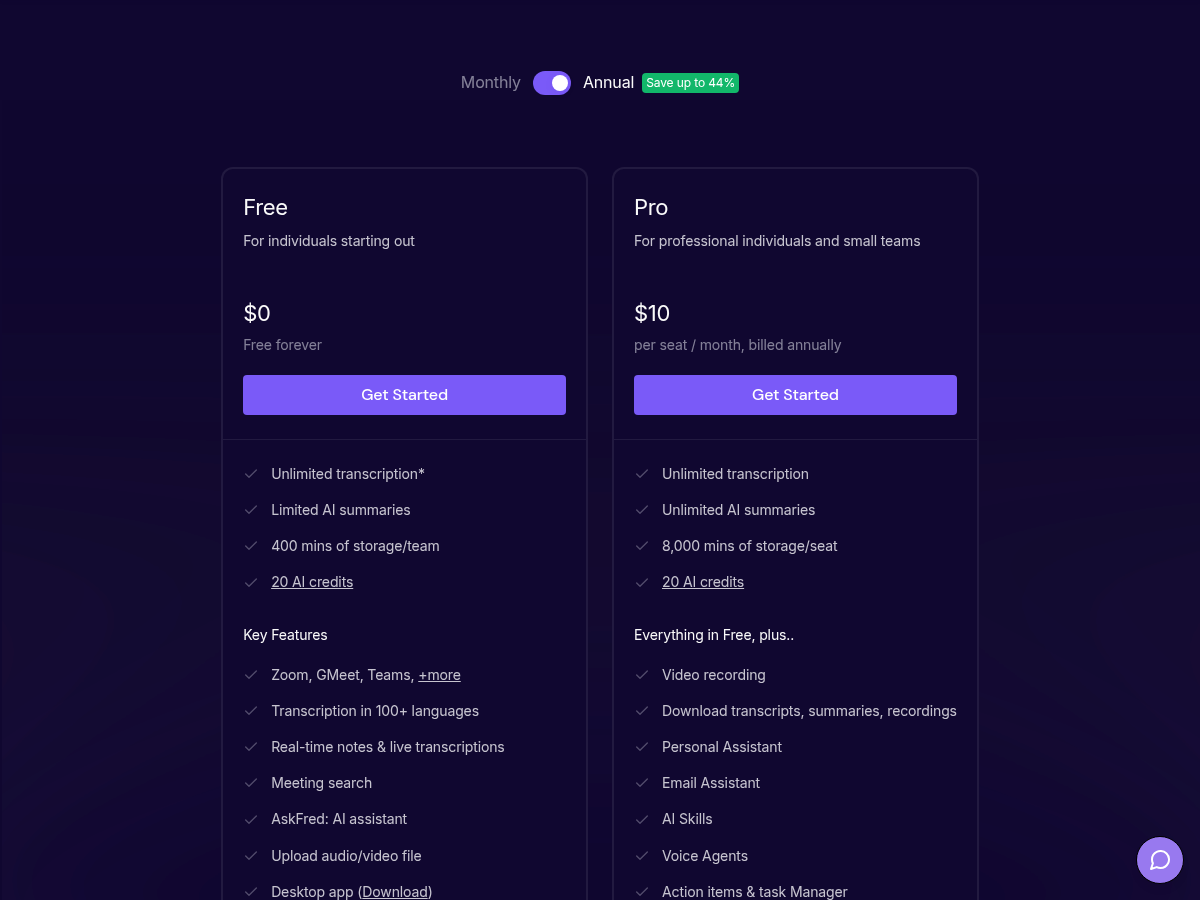
Fireflies pricing page, checked Nov 13, 2026
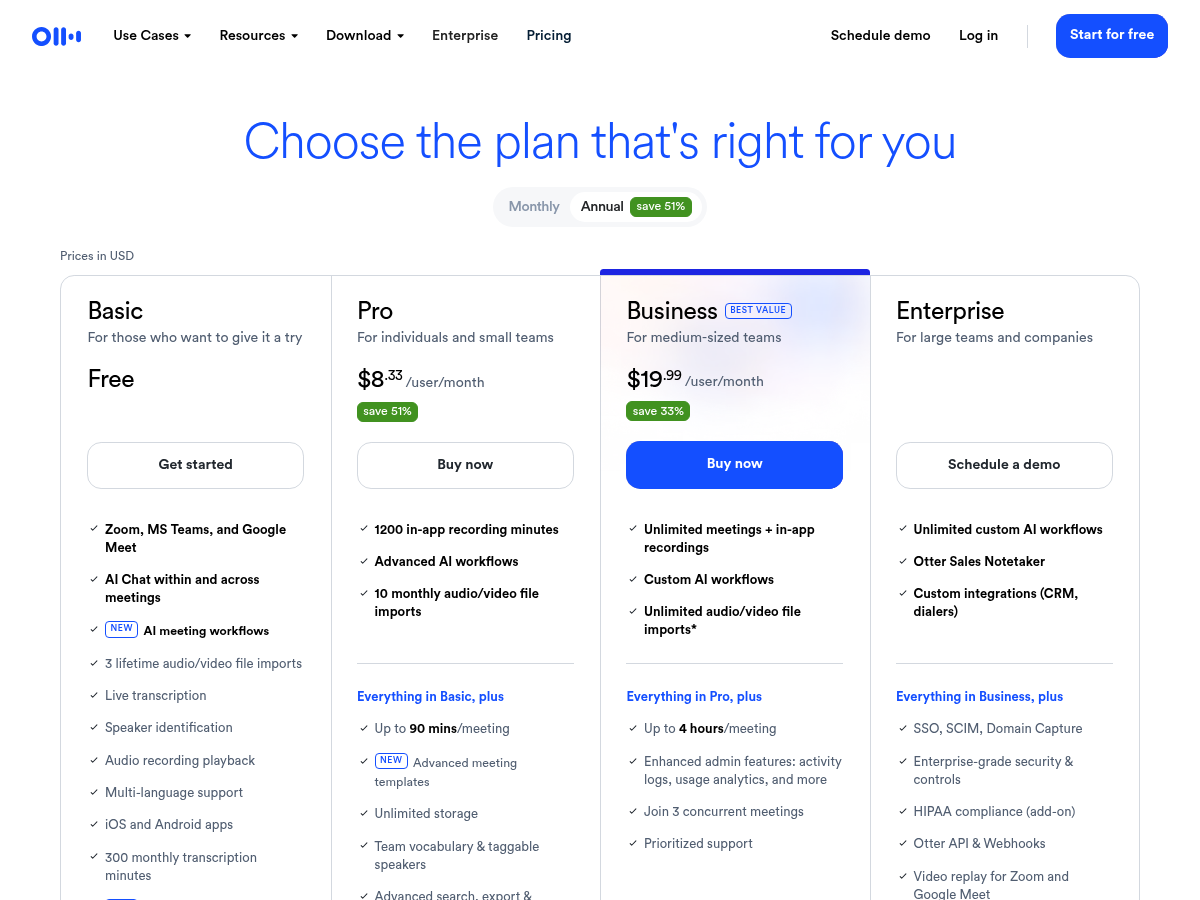
Otter pricing page, checked Nov 13, 2026
Who should pick which
- Solo consultant or coach with 45–60 minute calls: Fireflies Free is worth considering on its documented duration limit, if the recording method, qualifying Auto-join settings, consent and storage fit your workflow. Otter Basic records beyond 30 minutes, but only up to 30 minutes of transcript is accessible on Basic.
- Student or someone recording short check-ins: Otter Basic. 300 minutes a month of sub-30-minute recordings, with export, is plenty. The .edu discount helps if you upgrade.
- Team comparing longer meetings: check per-conversation duration separately from the monthly allowance, storage and export needs. Otter Pro lists 90 minutes per conversation and 1,200 minutes per month; Fireflies Pro lists up to 2 hours of meeting recording. Neither figure establishes transcription accuracy or makes either service the safer choice for your team.
- You do not want a bot in every meeting: compare the actual capture methods and privacy settings, not just the plan names. Fireflies documents extension and mobile recording as well as meeting bots, while its unlimited Free transcription still depends on a qualifying Auto-join configuration.
Verdict
Neither free plan wins for everyone. Fireflies Free offers a longer documented meeting-recording window, but its Auto-join conditions, storage limit and unresolved AI-feature terms matter. Otter Basic offers a 300-minute monthly allowance and access to up to 30 minutes of transcript per conversation. Choose around the recordings, transcript access, consent, retention and export needs you actually have.
Get Fireflies free here · Otter: otter.ai
FAQ
Which is free forever?
Fireflies calls its plan “Free forever.” Otter’s Basic plan is listed as free with no end date.
Can I use both?
Yes. They’re separate services, so you can run each on different meetings to compare.
Do both work with Zoom, Google Meet and Teams on the free plan?
Yes, both list Zoom, Microsoft Teams and Google Meet on their free plans.
Which is cheaper to upgrade?
Monthly, Otter Pro ($16.99) is cheaper than Fireflies Pro ($18). Annually, Otter Pro ($8.33/month) is also lower than Fireflies Pro ($10/month). But Otter Pro still has minute and meeting-length caps.
Is there a student discount?
Otter gives 20% off Pro to students and teachers with a .edu email. We didn’t find a student discount on Fireflies’ pricing page.
Related: Fireflies free plan review · Fireflies Talk comes to mobile · Fliki review
Sources
- Otter pricing: https://otter.ai/pricing (checked Nov 13, 2026)
- Fireflies pricing: https://fireflies.ai/pricing (checked Nov 13, 2026)
- Fireflies Free plan help article: https://guide.fireflies.ai/articles/4027724828-learn-about-the-fireflies-free-plan
- Fireflies unlimited transcriptions help article: https://guide.fireflies.ai/articles/8632872350-unlock-unlimited-transcriptions-on-the-fireflies-free-plan
- Fireflies billing terms (AI credits “one-time credits on sign-up”): https://guide.fireflies.ai/articles/9606045468-fireflies-billing-terms
- Fireflies meeting duration by plan: https://guide.fireflies.ai/articles/9592347753-how-long-can-fireflies-stay-in-your-meetings (rechecked Nov 13, 2026)
- Fireflies Free plan features: https://guide.fireflies.ai/articles/6176608577-learn-about-fireflies-free-plan-features (rechecked Nov 13, 2026)
- Fireflies Pro features: https://guide.fireflies.ai/articles/1092250300-learn-about-fireflies-pro-tier-features (rechecked Nov 13, 2026)
- Otter Basic import and transcript-access limits: https://help.otter.ai/hc/en-us/articles/360047538094-Conversation-import-and-app-limits-on-the-Basic-free-plan (rechecked Nov 13, 2026)
Targeted source recheck — November 13, 2026 (MYT): We rechecked the pricing pages, meeting-duration limits, Otter Basic’s transcript-access rule, Fireflies’ Auto-join conditions and conflicting Fireflies AI-credit descriptions. This was a documentation check, not a hands-on product test. Other figures retain their original check date.
Original comparison check: November 4, 2026 (MYT). Targeted updates are dated separately above.