
Disclosure: the Fireflies.ai links on this page are affiliate links. If you sign up through them we may earn a commission, at no extra cost to you. All other links are plain links. See our affiliate disclosure. Based on Fireflies.ai’s official pricing and feature pages, checked November 13, 2026.
Quick verdict
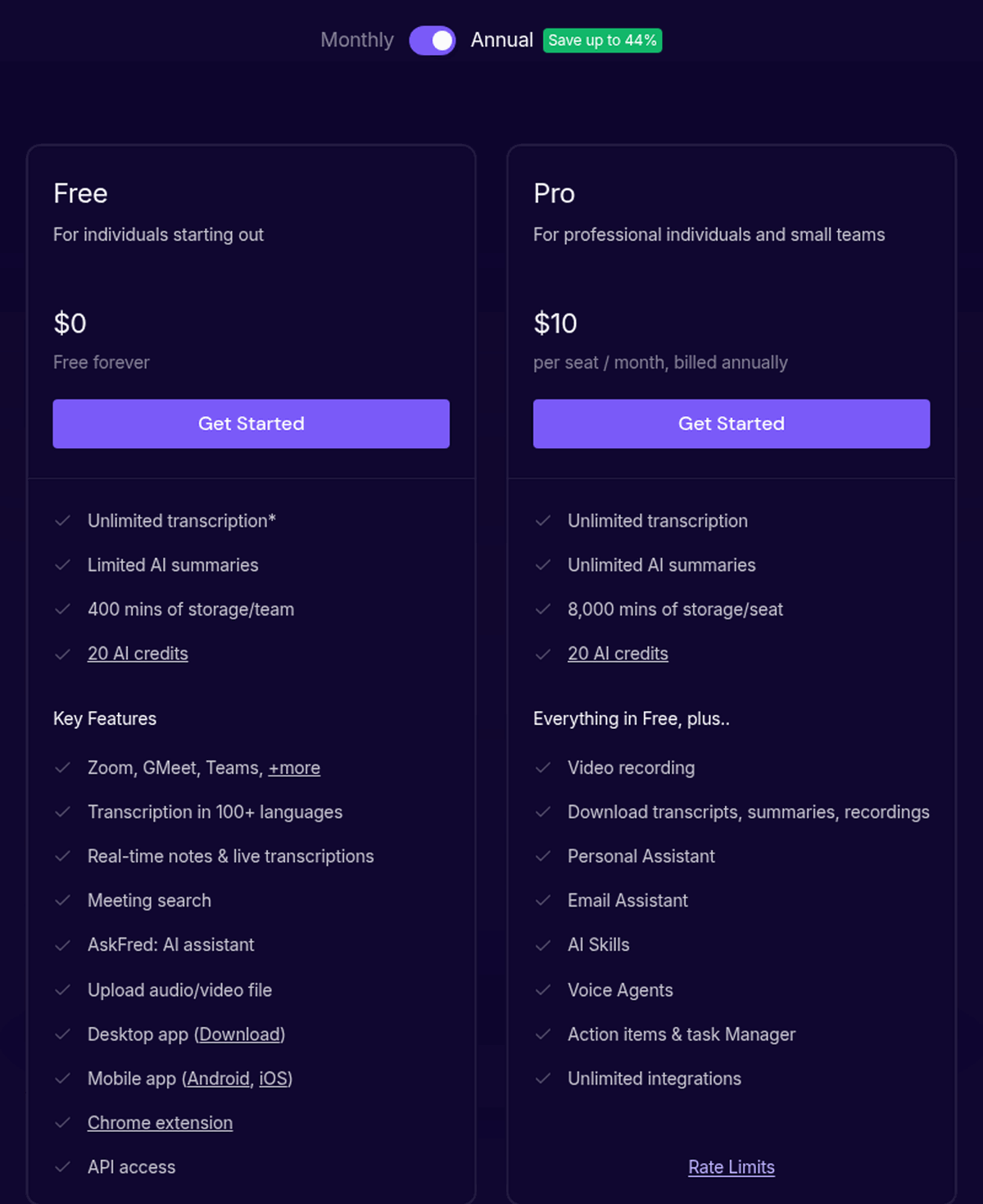
Fireflies.ai’s Free plan really is free forever, and integrations are included. The catches: a 400-minute storage cap, 20 AI credits and, for accounts created on or after September 1, 2026, only 3 meeting transcriptions unless you switch on Auto-join. If you’re in meetings all day, you’ll probably end up on Pro ($10 per seat/month (billed yearly)).
Our take from the official pages: the storage cap is the binding limit for most users — five 1-hour meetings a week fills 400 minutes in under two weeks — and the AI-credit pages disagree with each other, so plan on the 20 credits being one-time until your dashboard says otherwise.
Is Fireflies.ai free? Yes. The official pricing page lists Free at $0 and labels it “Free forever”. But there are strings attached. Storage is capped at 400 minutes, AI features run on a small AI-credit allowance, and new accounts (signed up on or after September 1, 2026) get unlimited transcription only when Auto-join is turned on. Otherwise they’re limited to 3 meeting transcriptions.
What are the Fireflies free plan limits? Per Fireflies’ own pages: 400 minutes of storage, 20 AI credits, a 2-hour recording limit, “Limited” AI summaries, no transcript/recording downloads, no video recording, and API access at 30 requests/min and 500/day. New account? Then you also need Auto-join switched on to avoid the 3-transcription cap.
Pricing
Prices are in USD, per seat. Each figure links to the official page we read it on, on 2026-11-13.
| Plan | Price | Key limits | Source |
|---|---|---|---|
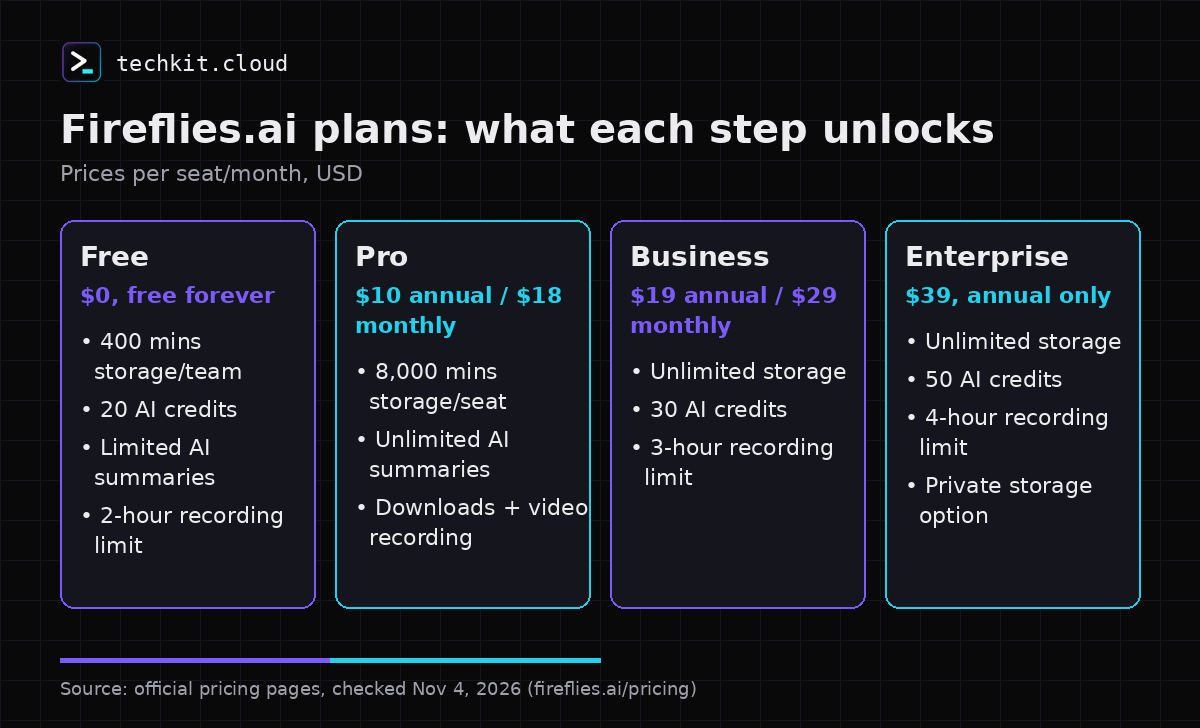
| Free | $0, “Free forever” | 400 mins storage/team (help center says per seat), 20 AI credits, 2-hour recording limit, Limited AI summaries, Integrations: All, API 30/min · 500/day | fireflies.ai/pricing (checked 2026-11-13) |
| Pro | $10 per seat/month (billed yearly); $18 billed monthly | 8,000 mins storage/seat, 20 AI credits, 2-hour recording limit, unlimited AI summaries, downloads, video recording, Integrations: All, API 60/min · 5,000/day | fireflies.ai/pricing (checked 2026-11-13) |
| Business | $19 per seat/month (billed yearly); $29 billed monthly | Unlimited storage, 30 AI credits, 3-hour recording limit, Integrations: All | fireflies.ai/pricing (checked 2026-11-13) |
| Enterprise | $39 per seat/month (billed yearly), annual only | Unlimited storage, 50 AI credits, 4-hour recording limit, Integrations: All, private storage option | fireflies.ai/pricing (checked 2026-11-13) |
The pricing FAQ says volume discounts are available if you buy for more than 50 members. Extra AI credits (paid plans only) start at 50 credits for $5/month, per the billing terms (checked 2026-11-13). The billing terms say refund eligibility depends on Fireflies’ refund policy and that AI credits are non-refundable. We didn’t find a fixed refund window, so we won’t guess at one.
Pros and cons
Pros
- Free forever. No trial clock.
- Integrations are listed as “All” on every plan, Free included, and the help center says “All integrations are available on the Free plan”.
- Works with Zoom, Google Meet and Teams, plus a Chrome extension and mobile app.
- Transcription in 100+ languages (English primary, many in beta).
- You can share recap links with non-members at no cost.
- Pro is $10 per seat/month on annual billing.
Cons
- New accounts (from September 1, 2026) are limited to 3 transcriptions unless Auto-join is on.
- Only 400 minutes of storage on Free.
- 20 AI credits (one-time per billing terms) and “Limited” AI summaries.
- No downloads or video recording on Free.
- Fireflies’ own pages disagree on storage scope and AI-credit resets (details below).
- Sign-up only through Google or Outlook.
Who it’s for
- Freelancers and consultants who want searchable call notes and don’t mind deleting old meetings.
- Coaches and course creators running a few calls a week who want to try AI notes before paying.
- Small teams checking whether an AI notetaker fits their workflow before buying Pro seats.
Skip it if you need exports or a long archive from day one. Per the official plan table, those start on Pro (downloads) and Business (unlimited storage).
Key features
What the free plan includes
According to the Free card on the official pricing page and the Free plan help article:
- Unlimited transcription*. The asterisk matters (see the Auto-join rule below). Note that the comparison table on the same page lists Free’s “Transcript” row as “Limited”.
- Limited AI summaries (Pro and above: unlimited).
- 400 minutes of storage.
- 20 AI credits for features like AskFred, AI Soundbites and AI Skills.
- A 2-hour recording limit per meeting.
- Uploads: MP3, MP4, WAV or M4A, up to 100MB and 150 minutes per file, 1 transcription credit per file (help center).
- Starting transcription credits depend on where you signed up (help center): website (bot) 3, Chrome extension 5, mobile app new user 10, mobile app existing user 5.
- Channels: three default channels plus up to three extra public channels.
- Fireflies Talk (voice dictation on desktop and mobile: iPhone and Android) on every plan, per the help center.
The Auto-join rule for accounts created since September 1, 2026
Fireflies’ help article Unlock Unlimited Transcriptions on the Fireflies Free Plan says these limits apply to users who sign up on or after September 1, 2026. If your free account is older, nothing changes.
- Auto-join on: Fireflies joins and transcribes your eligible meetings, with no cap on the number of transcriptions.
- Auto-join off: you’re stuck with the Free plan’s default of 3 meeting transcriptions.
- The Auto-join option “Only when I invite fred@fireflies.ai” doesn’t count. You need one of the other options (all meetings with a web-conference link, only meetings you own, or only meetings with teammates).
- You can still invite fred@fireflies.ai to a single meeting manually, but that only covers that meeting.
- Unlimited transcripts refers to raw text, not unlimited storage or a guaranteed allowance of AI features. Fireflies’ Auto-join help page says summaries depend on credits, while its billing terms say summaries and recap emails are never charged in credits. The official pages do not give a consistent answer.
How to turn it on, per the article: Settings → Meeting Settings → toggle Auto-join calendar meetings on, then pick a meeting filter other than “Only when I invite fred@”.
What you don’t get on Free
According to the official plan cards, Pro adds video recording and downloads of transcripts, summaries and recordings. The help center confirms “Downloading transcripts requires a paid plan”. Business adds Multi-language Mode, conversation intelligence, team analytics for admins and unlimited storage.
Correction on integrations. An earlier version of this article said app/CRM integrations were premium-only. As of November 13, 2026, the official comparison table lists Integrations: “All” on Free, Pro, Business and Enterprise, and the help center says “All integrations are available on the Free plan” (50+ apps, including CRMs and project tools). The older FAQ line on the pricing page (“access to App & CRM integrations on the premium tiers”) still contradicts this. We’re going with the current plan table. Still, check before you count on a specific integration. The FAQ does still say audio transcription through Zapier starts on Pro.
AI credits: monthly or one-time?
The pricing page says “20 AI credits” for Free with no period attached. The Free plan help article says “20 AI credits per month”. The billing terms article, calls them “one-time credits on sign-up” (Free 20, Pro 20, Business 30, Enterprise 50). It says plan credits don’t expire, are pooled across the team, and are replaced rather than stacked when you upgrade. So Fireflies’ pages disagree on whether Free AI credits reset monthly. The billing terms go into more detail, so we’d plan as if they’re one-time until your dashboard says otherwise.
The billing terms also say that when a Free user runs out, they see a paywall, and “no charge occurs unless you affirmatively upgrade”. Extra AI credits are a paid add-on, only on paid plans, starting at 50 credits for $5/month (or $4/month (billed yearly)), per the billing terms (checked 2026-11-13). On paid plans, running out of plan credits automatically subscribes you to that $5/month tier, so keep an eye on it. The same page says summaries, transcription and recap emails are never charged in credits. Yet the Auto-join help article says AI summaries depend on your credit balance. Another mismatch.
Paid plan AI credits from the plan cards: Pro 20, Business 30, Enterprise 50.
Storage: per team or per seat?
The pricing page says “400 mins of storage/team”. The help center says “400 minutes of storage per seat”. When you hit the limit, the help center says to delete older files to make room. Quick math (not a test): five 1-hour meetings a week is 300 minutes, so 400 minutes fills up in under two weeks.
Free vs Pro
| Need | Free | Pro |
|---|---|---|
| Price | $0 | $10/seat/mo annual, $18 monthly |
| Meeting transcription | Unlimited* (Auto-join rule for new accounts) | Unlimited |
| AI summaries | Limited | Unlimited |
| Storage | 400 mins | 8,000 mins/seat |
| AI credits | 20 | 20 |
| Recording limit | 2 hours | 2 hours |
| Video recording | No | Yes |
| Download transcripts/recordings | No | Yes |
| Integrations | All | All |
Source: fireflies.ai/pricing, checked 2026-11-13.
Stay on Free if you have a handful of calls a week and only need searchable text. Go Pro if you record client calls daily, need to export them, or keep running out of storage.
How seats work
Any teammate you add to your workspace counts as a seat, and paid plans are charged per seat. According to the FAQ, you can share individual meeting recap links with participants or others without adding them to your team, and it’s free.
Sign-up requirements
The FAQ says sign-in is only possible with Google Auth or Outlook Auth. Enterprise customers can ask about SSO.
Security notes
The pricing page lists SOC 2 Type II, ISO 42001 and GDPR. It also lists HIPAA/FERPA (BAA and DSA “available on Enterprise with Private Storage”), so HIPAA isn’t a Free feature. The FAQ cites 256-bit AES encryption at rest and 256-bit SSL/TLS in transit.
Alternatives
Comparing meeting-note tools? Our Fireflies vs Otter free-plan comparison separates monthly allowances, per-conversation limits and transcript access, with the Auto-join and storage conditions made explicit.
More in our “free plan, real limits” series:
- Podia free plan
- Thinkific free plan
- Systeme.io tutorial (if your calls feed a small online business)
FAQ
Is Fireflies.ai free forever?
Yes. The official pricing page labels Free “$0, Free forever”.
Does Fireflies free work with Zoom, Google Meet and Teams?
Yes. The Free card lists Zoom, GMeet, Teams and more.
How do I get unlimited transcripts on Fireflies free?
If you signed up on or after September 1, 2026, turn on Auto-join calendar meetings and choose any filter except “Only when I invite fred@fireflies.ai”. With Auto-join off, you’re limited to 3 transcriptions.
How many AI credits does the free plan get, and do they reset?
- The billing terms call them one-time sign-up credits, while the Free plan help article says “per month”, so Fireflies’ pages disagree. On Free, running out shows a paywall rather than charging you.
What happens when Fireflies storage is full?
The help center says you need to delete older files to store new ones. Unlimited storage starts on Business.
Can I download transcripts on the free plan?
No. The help center says “Downloading transcripts requires a paid plan”.
Are integrations available on Free?
The current plan table and help center say yes, all integrations. An older pricing FAQ line says otherwise.
What’s the cheapest Fireflies paid plan?
Pro: $10 per seat/month (billed yearly), or $18 billed monthly (checked 2026-11-13).
Want to see whether Free covers your meetings? Sign up, turn on Auto-join, and watch your storage.
Last updated 2026-11-13
Related on techkit.cloud
- Fireflies Talk comes to mobile
- Lunacal review for coaches
- Invoice Ninja free plan
- Fliki review
- all free plan reviews
Sources
All checked 2026-11-13:
- https://fireflies.ai/pricing (plan cards, comparison table incl. Integrations “All”, recording limits, AI credits 20/20/30/50, prices, FAQ, security)
- https://guide.fireflies.ai/articles/4027724828-learn-about-the-fireflies-free-plan (storage per seat, 20 AI credits per month, credits by sign-up source, uploads, “All integrations are available on the Free plan”, downloads need paid plan)
- https://guide.fireflies.ai/articles/8632872350-unlock-unlimited-transcriptions-on-the-fireflies-free-plan (September 1, 2026 rule, 3 transcriptions with Auto-join off, fred@ exception)
- https://guide.fireflies.ai/articles/9606045468-fireflies-billing-terms (plan prices, one-time AI credits 20/20/30/50, AI credit add-on from 50 credits $5/mo on paid plans only, Free paywall with no charge, AI credits non-refundable)
12 thoughts on “Fireflies.ai Free Plan 2026: Real Limits, Credits & Pro Cost”