

Disclosure: This post contains affiliate links. If you buy through them we may earn a commission at no extra cost to you. See our Affiliate Disclosure.
Based on quso.ai’s official pricing and feature pages, checked November 14, 2026.
Quick verdict
As of November 2026, quso.ai’s free plan costs $0 and includes 75 credits a month (about 75 minutes of processing), 720p exports with a quso.ai watermark, and 7-day data retention. Paid plans start with Lite at $29/month, or $174 billed yearly.
That is enough to clip roughly one hour-long podcast or stream a month and post the results to TikTok. It is not enough for a weekly show, and the 7-day retention means the free plan only works if you export your clips the same week you make them.
What the free plan includes
On a narrow screen, swipe the table sideways to see every column.
| Item | Free plan | Source |
|---|---|---|
| Price | $0, no credit card | quso.ai/pricing, Subscription plans, checked 2026-11-14 |
| Credits | 75 a month (1 credit ≈ 1 minute of imported video) | quso.ai/pricing, How credits work, checked 2026-11-14 |
| First import | Can be up to 150 minutes long | How credits work, checked 2026-11-14 |
| Export quality | 720p with a quso.ai watermark | quso.ai/pricing, checked 2026-11-14 |
| Clip formats | 16:9, 9:16 and 1:1; chapters and short videos | quso.ai/pricing, checked 2026-11-14 |
| Publishing | TikTok only, up to 25 posts a month, including TikTok auto-post | Subscription plans, checked 2026-11-14 |
| Storage | 5 GB | Subscription plans, checked 2026-11-14 |
| Data retention | Projects deleted after 7 days | quso.ai/pricing, Subscription plans, checked 2026-11-14 |
| Uploads at the same time | 1 | Subscription plans, checked 2026-11-14 |
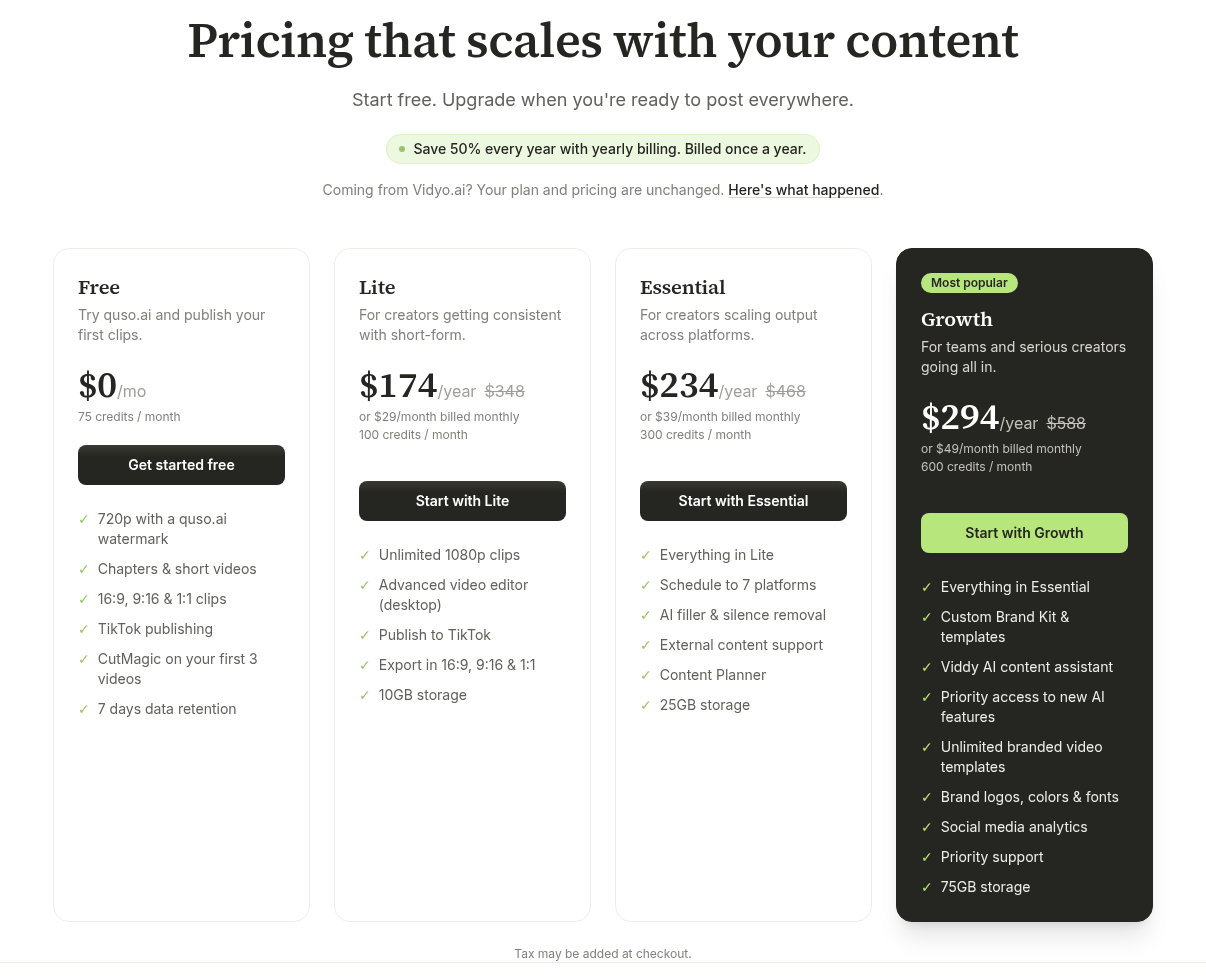
One thing to know before you sign up: the free plan is not the same everywhere. quso.ai’s FAQ says that in some countries you get the free plan with 75 credits a month, while in others you buy one-time credit packs with no subscription. The help center adds that in a few countries the free credits are a one-time grant instead of a monthly renewal. The prices in this post are the standard US prices on quso.ai/pricing; the app shows prices in your local currency, and the price at checkout is the one you pay.
The real limits
75 credits, counted by video length
According to quso.ai’s help center, 1 credit equals 1 minute of video you import, rounded up to the next full minute. Credits are deducted when you import a video into AI Clips, AI Captions or AI Writer. The help center’s own examples: a 42-minute video uses 42 credits, a 25 min 40 s video uses 26, and a 40-second video uses 1.
The charge is for the length of the source video, not the number of clips you get out of it. Editing, rendering, downloading and publishing clips afterwards use no more credits. quso.ai also says the credit cost is shown before processing starts.
Free credits renew every month (except in the few countries with a one-time grant). Unused plan credits do not roll over. If a video fails to process, the credits are refunded automatically.
720p with a watermark
Free exports are 720p and carry a quso.ai watermark. According to the help center, every paid plan removes the watermark and exports in 1080p. No plan exports in 4K.
7-day data retention
Projects on the free plan are deleted after 7 days. On paid plans they are kept until you delete them.
CutMagic
The pricing page lists “CutMagic on your first 3 videos” for the free plan. The help center’s plan table, however, marks CutMagic as a Lite-and-up feature. Treat it as a short preview at most, not something the free plan gives you for good.
How far 75 credits go
This is an estimate based on quso.ai’s official rule that 1 credit is about 1 minute of imported video.
On a narrow screen, swipe the table sideways to see every column.
| What you import each month | Credits used | Fits in 75? |
|---|---|---|
| One 60-minute podcast episode | 60 | Yes, with 15 credits left |
| Two 30-minute episodes | 60 | Yes |
| Two 40-minute episodes | 80 | No |
| Four weekly 20-minute videos | 80 | No |
| Seven 10-minute videos | 70 | Yes |
quso.ai’s own FAQ confirms the first row: a 1-hour podcast uses 60 credits. So the realistic free-plan budget is about one full-length episode a month, or a handful of short videos. Rounding works against you on many short files: ten 7 min 10 s videos round up to 8 credits each, which is 80 credits, more than the free allowance.
A free-plan workflow that actually works
Because projects are deleted after 7 days and publishing is TikTok only, the free plan fits one specific routine:
1. Record your long video or episode.
2. Import it into quso.ai the same week, checking the credit cost shown before processing.
3. Pick your clips, then download them or post them to TikTok (up to 25 posts a month) before the 7 days run out.
4. Keep your own copies of anything you might want to re-edit later.
If you want to come back to a project weeks later, re-cut old clips, or post straight to YouTube Shorts or Instagram from quso.ai, the free plan won’t cover it. Those needs point to a paid plan, and for multi-platform posting specifically to Essential, not Lite.
Free vs Lite: when to upgrade
On a narrow screen, swipe the table sideways to see every column.
| Free | Lite | |
|---|---|---|
| Price | $0 | $29/month billed monthly, or $174/year billed yearly |
| Credits per month | 75 | 100 |
| Export | 720p, watermark | 1080p, no watermark |
| Storage | 5 GB | 10 GB |
| Projects kept | 7 days | Until you delete them |
| Publishing | TikTok only | TikTok only |
| Uploads at the same time | 1 | 3 |
| Virality score, SRT download, AI description | No | Yes |
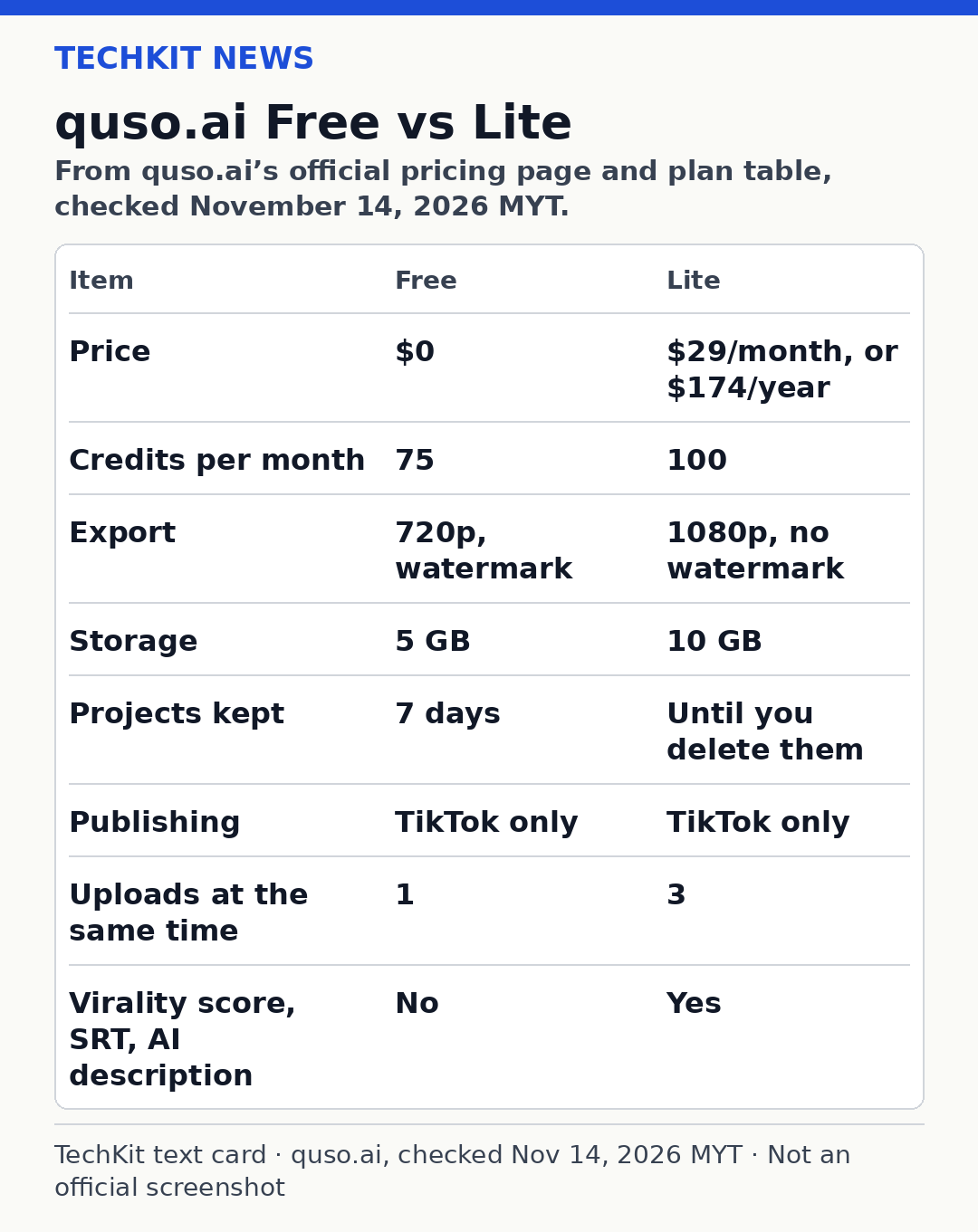
Sources: quso.ai/pricing and Subscription plans, checked 2026-11-14.
What stands out: Lite adds only 25 credits over the free plan. You are not paying for volume; you are paying for clean 1080p exports, projects that don’t disappear after a week, and a few extras like SRT caption downloads. Lite still publishes to TikTok only.
On yearly billing Lite costs $174, which works out to $14.50 a month. The pricing page shows $348 struck through next to it and says yearly billing saves 50%. On annual plans, quso.ai gives you all 12 months of credits upfront when the year starts.
The paid tiers above Lite, per the pricing page:
On a narrow screen, swipe the table sideways to see every column.
| Plan | Monthly billing | Yearly billing | Credits per month | Cost per credit (monthly billing) |
|---|---|---|---|---|
| Lite | $29 | $174/year | 100 | $0.29 |
| Essential | $39 | $234/year | 300 | $0.13 |
| Growth | $49 | $294/year | 600 | about $0.08 |
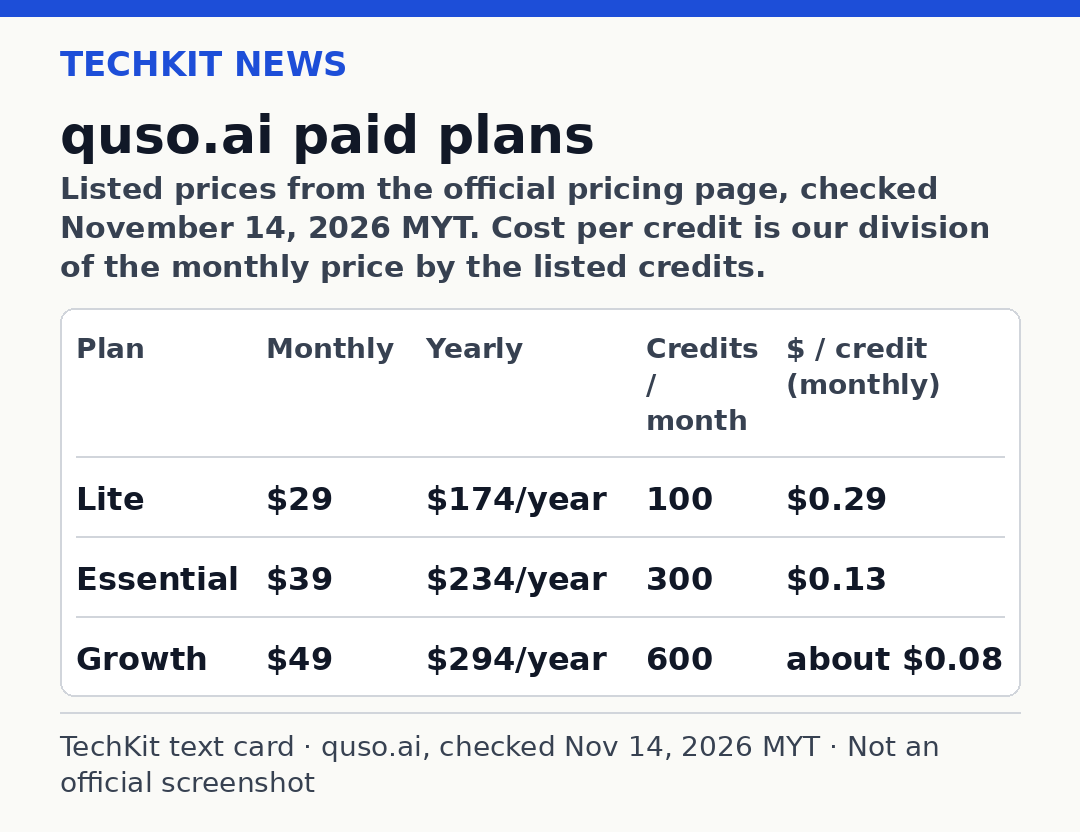
The cost-per-credit column is our own division of the listed price by the listed credits. It shows why Lite is the weakest value per minute: Essential costs $10 more a month but triples the credits and adds scheduling to other social platforms, not just TikTok.
Upgrade to Lite if the watermark or 720p is the only thing stopping you and one or two episodes a month is your real volume.
Go to Essential instead if you post to more than TikTok, or you process more than about 100 minutes of video a month.
Stay free if you are testing whether AI clipping suits your content at all.
quso.ai vs vidyo.ai (same product)
quso.ai is the new name for vidyo.ai. According to quso.ai’s rebrand page, vidyo.ai became quso.ai in January 2025 with the same login, plan, price, credits and projects. The pricing page says the same: “Coming from Vidyo.ai? Your plan and pricing are unchanged.” If you are searching for the “vidyo ai free plan,” this is it.
Pros and cons
Pros
– $0 with no credit card, and 75 credits that renew monthly in most countries
– You’re charged by source length, and editing, downloading and publishing are free after import
– Failed imports refund their credits automatically
– 16:9, 9:16 and 1:1 clips on every plan, including free
– TikTok publishing included on the free plan
Cons
– 720p exports with a quso.ai watermark
– Projects deleted after 7 days
– Only about one hour-long episode a month
– Free plan availability and form vary by country
– Free and Lite publish to TikTok only
Alternatives
– OpusClip free plan: the closest like-for-like AI clipping tool with a free tier
– Zebracat pricing: AI video creation from text, rather than clipping long videos
– Fliki review: text-to-video and AI voiceover
FAQ
Is quso.ai free?
Yes, in most countries. quso.ai’s free plan costs $0, needs no credit card and gives you 75 credits a month, which is about 75 minutes of imported video. Exports are 720p with a watermark and projects are kept for 7 days. In some countries quso.ai offers one-time credit packs instead of a free plan, so check the pricing page for your country.
Does quso.ai free have a watermark?
Yes. quso.ai’s pricing page lists free exports as “720p with a quso.ai watermark.” According to quso.ai’s help center, all paid plans, starting with Lite at $29 a month, remove the watermark and export in 1080p. The free plan has no option to export without the watermark.
How many credits do you get free?
The free plan includes 75 credits a month. One credit covers one minute of imported video, rounded up, so a 60-minute podcast uses 60 credits. Unused credits do not roll over. In a few countries the free credits are a one-time grant rather than a monthly renewal, according to quso.ai’s help center.
Is quso.ai the same as vidyo.ai?
Yes. Vidyo.ai rebranded to quso.ai in January 2025. According to quso.ai’s rebrand page, your login, plan, price, credits and projects carried over unchanged, and the same team builds the product. Former vidyo.ai users sign in at quso.ai with the same email and password.
How much is quso.ai Lite?
Lite costs $29 a month billed monthly, or $174 a year billed yearly, which works out to $14.50 a month. It includes 100 credits a month, 1080p exports with no watermark, 10 GB storage and projects that are kept until you delete them. Like the free plan, it publishes to TikTok only.
quso.ai vs OpusClip free plan: which is better?
It depends on your workflow. As of November 14, 2026, quso.ai’s free plan gives 75 credits a month, 720p exports, TikTok publishing and 7-day retention. OpusClip’s free plan gives 60 credits a month and clips up to 1080p with a watermark, but no editing, and clips can’t be exported after 3 days. Choose OpusClip for sharper exports, and quso.ai for the longer 7-day window and built-in TikTok publishing.
Final word
quso.ai’s free plan is a real free tier, not a trial. It is enough to learn the tool and clip about one long video a month for TikTok. Once the watermark, the 7-day deletion or the TikTok-only publishing gets in your way, compare Lite with Essential before you pay; for most creators posting beyond TikTok, Essential is the better buy.
Start with quso.ai’s free plan
Last updated: November 14, 2026.
Sources
– quso.ai pricing page (official) — https://quso.ai/pricing — checked November 14, 2026 (date not shown on the page)
– quso.ai help: How credits work (official) — https://quso.ai/help/how-credits-work — checked November 14, 2026 (date not shown on the page)
– quso.ai help: Subscription plans (official) — https://quso.ai/help/subscription-plans — checked November 14, 2026 (date not shown on the page)
– quso.ai FAQ (official) — https://quso.ai/faq — checked November 14, 2026 (date not shown on the page)
– quso.ai rebrand page (official) — https://quso.ai/vidyo-ai — checked November 14, 2026 (date not shown on the page)
– OpusClip pricing page (official), used only for the free-plan comparison — https://www.opus.pro/pricing — checked November 14, 2026 (date not shown on the page)